


Blog
Thoughts and things I care to shareArticle available on iMate Products for 2006
Head on over to Smartphone & Pocket PC Magazine for an overview of the current and upcoming devices from iMate. iMate retails their own version of HTC Corporation products, direct into the retail channel. The article by Timothy S. Hillebrand covers the JASJAR, K-JAM, PDA-N, SP5, SP5-m, JAMMIN, and also talks about his personal likes and dislikes of the models. Its a good read.
Okay, the fun begins tomorrow morning.
Our Disaster Recovery test starts mid-morning tomorrow and runs for 48 hours, and I’m going to try to blog as much of it as I can. What I plan to record here are my experiences, observations, and opinions.
In addition to me blogging DR, we created a DR Blog for the team. Suffice it to say, we will be running the “DR Blog” as proof-of-concept, and will review the usefulness at a later date. Future endeavors will be determined by the positive/negative feedback that this last-minute “test” will provide. As our DR Team blog is unique to this test and is proprietary to my employer, I’ll not post the URL here, but I will blog here about that blogging exercise and my opinions of it.
To me this is a huge step for our IT team, its the first time we have used blogging for a specific purpose, and the neat thing about it is that it was able to be put into play with a suggestion and 30 minutes of effort on my part to set it up on one of my own blogging accounts out on the ‘net.
That really underlines the impact of a blog. You can set one up in minutes, and get an entire team organized and ready to provide feedback, take notes, record problems & resolution, communicate status, share jokes, ask questions… the list of course is infinite, only confined by ones creativity.
More to come…
Busy, Busy, Busy…
Today on through the end of the week will be a busy time – may not have time to post. Or, I may have a lot of posts over the next few days.
The company I work for will be performaing a “DR” or Disaster Recovery test this week, and I’ll be participating. We always learn a lot about what a small group of dedicated people can do when we run a test like this, and we manage to have fun doing it.
So I’m going to try to “Blog DR” this time, just for fun.
Figured out the Sidebar issue!
Ugh! Somewhere I must have deleted a “/div” statement. The strange thing is that it shown up a few hours after I had done some editing of the index.php file, so it was hard to track down.
Thanks to the forums over at WordPress.org – they helped me find the simple things that most users miss when editing their layout files.
Blog Layout Issues
Ugh, more layout/rendering issues. I’ve had this happen before where the darn sidebar all of a sudden starts rendering after the end of the main page. Not sure what caused this all, but last time it had to do with the code from StatCounter being in the wrong PHP template file. This behavior started around 8pm CT tonight, and I had not made a change to the site, so I’m a little confused at the moment as to what is causing the problem.
Anyway, I’ll be working to figure out what the issue is and make it right. Sorry for any inconvienence! The sidebar content is here, just scroll down to find it.
UPDATE: Nothing so far, I’ve reviewed all the theme files, and believe it may be related to something else because it happens with the “kubrik” theme as well, which has not been modified on my installation. Well, I’ll keep working at it – strange though, because I did not change anything.
New HTC Star100
Would you like to see the first HTC flip-phone? If so, check out MS Mobiles‘ post on the new HTC STAR100 phone.
They’ve got a full photo spread on the new device, and a lot of information including the scoop on AKU2 (Push Mail update) and A2DP (Stereo Bluetooth Headphone) support built in.
Well there is more in their post than I can do just in hinting at, I mean they have a LOT of photos of the new phone.
New coComment Integration Features
 Well, OK it may not be “new” news, but it had been awhile since I checked out the updates that coComment has been working on for their wonderful comment tracking service. Among the enhancements to already supported blogging software, they have added a Promotion page and an Integration page.
Both these pages have additional information on promoting their service and coComment functionality to additional blogging software. Go have a look when you get a chance.
Review – Attensa Online
Â
Overview
Attensa Online is a free basic RSS reader, available via both Internet Explorer and Firefox browsers. Similar to NewsGator, Attensa has products for purchase that fill a more feature-packed roll as News Readers. Attensa for Outlook ties into Microsoft Outlook similar to NewsGator Inbox, and Attensa Mobile (available soon) is targeted to mobile device users. The free Attensa Online product also plays a role in the other product offerings, mainly as a central synchronization tool, so you can access your feeds from anywhere.
Accessing news from anywhere has always been a useful part of the Internet experience. And Attensa Online answers that need in full with a simple, easy to use, speedy news reader. Attensa can be accessed from anywhere via browser, using a nice AJAX interface that makes reading your feeds quick and simple.
Primer
Before we get too far into this review, here are some links to read up on what RSS, ATOM, Web Feeds, OPML, and news aggregators are.
Features
The main attraction of Attensa is the simplicity of the interface. The list of feeds are on the left, while the scrollable reading pane is on the right. I was impressed with the ability to scroll the reading pane while the feed list remained stationary on the left. NewsGator Online does not have this ability, and you will enjoy not having to scroll back to the top of the page to move to your next feed. In addition, you can adjust the reading pane using three different view types. One displays the feed contents in a one-line-per-post view that makes efficient use of space, the second option shows two lines of the body of each post in a list view. Both of these view options use the upper-half of the reading pane for the list, and use the bottom half as a viewing pane – there are options to turn this off/on. The third (and my choice) shows three lines of the body text of each post, and allows for more space in the view list. The bottom viewing pane is not available in this view and each click of a feed’s post opens a new browser window (or tab) that displays the full post at the respective website.
There are the standard tools which allow you to mark posts/feeds as read, delete them, import new feeds via OPML, or add them manually. Again, there is no method for exporting your list of feeds once you’ve set them up. You can manage the feeds, by folder or category, but little else.
Usability
The simplicity of the AJAX implementation here is great, because all commands are available via a right-click on a feed or folder. It is quite intuitive to right-click and “mark all read/unread”, or to delete the feeds/folders. Performance was snappy in both Internet Explorer 6 and Firefox 1.5 with very little hesitation between feed loads.
Summary
The casual or “newbie” RSS consumer will appreciate the simplicity and easy to read layout of Attensa online. Similar to NewsGator Online, seasoned RSS users would probably pass on the service as it simply does not offer any compelling functionality to match more mature feature-rich news aggregators.
- Pros: Fast, simple to use, easy to read layout, tie-ins to other product offers
- Cons: No export utility, restricted view options, other products offer little incentive to use service, online service is limited to other Attensa products
Â
This is encouraging – Opera Mini is Profitable
Opera, the other alternative browser (and a darn good one) discusses how mobile operators are making money using the Opera Mini browser. Mini was designed specifically for mobile phones, their small screen, and their keypad. Their press release yesterday gives a lot of detail on who is using it and how its being used.
Russell Beattie has a nice post on this topic as well. By the way Russ, nice new layout – kind of minimalistic, I like it!
One Month Review of the T-Mobile MDA
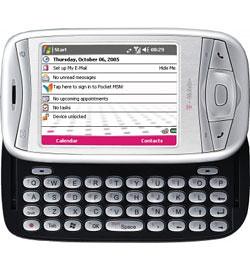 So I’ve had the T-Mobile MDA for about a month now and can give a good user-review of what I think. I must confess up-front that I’m fond of Windows Mobile, T-Mobile and HTC-built devices, so I’ll do my best to be objective. 🙂
Ultimate Device?
My purchase of the MDA has been a long story of wishing and waiting. My wife has put up with my writing feature wish list items with patient amusement. Muddling through delays, and finally the delivery of my *perfect* device. My requirements for a converged device have been met by the MDA. Period.
Battery/Power
Right out of the box I was not impressed with the battery performance. As with all Li-ion rechargeable batteries (this one is a Sanyo 3.7V 1250mAh Li-ion), it needs a few charge/discharge cycles to really get to full capacity. The first few days, I barely made it without a recharge. Two weeks later, I’ve made it through two days in a row with out a charge – twice. Now keep in mind that I’m checking 5 email accounts every 15 minutes, and have SBSH Pocket Weather updating current conditions every 15 minutes, and 14 bitmap images every 30 minutes. I use the phone portion of the device around 30 minutes a day.
Syncing
ActiveSync 4.1 (AS4) is a great improvement over previous versions, and I’ve had no problems with it synchronizing my data. Now with that said, I must point out that the change in how AS4 connects over USB does have an impact on syncing when you have a personal firewall. Microsoft has published an ActiveSync connection troubleshooting guide that can help you out if your personal firewall software is blocking the sync traffic.
Performance
Hmm, this is a mixed bag for the MDA. Personally, I have issues with the performance, coming from an iPaq h4155 that had a 400MHz processor, I notice a drastic difference. My usage is different than most however. My device runs 5 Today screen plug ins round the clock, along with a task switcher, and email client (see the list below). All this (along with a nice spiffy skin & theme), slow the device considerably. Without this added software, it actually performs quite well! The slower processor is of course much easier on the battery. My wish would have been to have at least a 312MHz processor in the device and a slightly larger battery – but that would just be nit-picking, I’m very comfortable with the performance.
Wireless
The wireless functions of this device are exceptional. Yes T-Mobile only has GPRS/EDGE services, but I’ll have to tell you, coming from a 42K (maximum) connect speed on my Nokia 6600 (using GPRS) to the MDA’s EDGE speeds is a wonderful experience. I’ve actually hit 200kbps, and regular checks every few days in different locations have been in the 128kpbs to 170kbps range – very acceptable for my usage pattern. Your mileage and usage patterns may vary – but I hooked on the EDGE service alone. Just make sure to get an all-you-can-eat data plan!
Bluetooth occasionally gets a workout with syncing the device, and when taking notes on my ThinkOutside Bluetooth Keyboard and Mouse combination. This has to be the ultimate mobile office as far as I’m concerned. I can get on the ‘net, do my email and take notes all with pocketable devices. Fantastic!
WiFi is, as you would guess, a great thing to have on the device. I’ve not used WiFi very much on this device because EDGE service in my area is THAT GOOD, it completely eliminates my need to get to a hotspot.
Graphics
Actually, I’ve not much to say on the graphics of the device. They perform adequately enough that I never gave it much thought. While the MDA does not have a dedicated graphics chip, it works very well for me. I’m easy to please in this area since I don’t play any games, and really only push the device while watching video (which is streamed from my home PC via Orb).
One-Handed Useability
Out of the box, one-handed usability suffered as all PPC Phones have little in the way of simplicity like a phone does. Remember, PPC is a general-purpose computing device, capable of Audio, Video, Games, Personal Information Management, Web Browsing, News Reading, Email, Instant Messaging… the list goes on. With that being the case, the MDA (and all its cousins) need a little help in this department.
This is where I turned to the use of a program launcher on the Today screen. My choice (long ago) was iLauncher by SBSH software. With a Today screen program launcher, you can easily have a whole list of applications in icon form that you simply tap with your thumb. This makes it easy to switch apps, and start new ones.
In addition to the program launcher, I highly recommend remapping the physical buttons on the device. Two are all that is really needed. Since you can put a link to email and the browser on the today screen with a program launcher, you can remap the Mail button (upper left) to open the Start Menu (also in the upper left corner), neat huh? The other one I immediately remapped was the Internet Explorer button in the upper right corner. Since the “OK” button is in the upper right corner of the screen, this seemed appropriate to map here. Those two button re-assignments bring a whole new level of usefulness to the device. Even if you didn’t have a program launcher on the Today screen – the shortcuts are right on the Start Menu anyway.
More can be done in this area, but it really boils down to personal preference and working with the device to see what you like. Google a bit on MDA, Wizard, Prodigy, Qtek 9100, iMate KJAM, and 8125. These will turn up endless amounts o f customization options, tweaks, and ideas for you.
Durability
I’m surprised by the durability of the device, yet I keep wondering when the sliding keyboard will not “catch” any longer and simply slide in and out in my pocket. Yes I simply put the device in my pocket instead of a case on my belt. I just don’t like cases that make it harder to get to my device, and I’ve often knocked many lesser mobile phones off my belt onto… pavement and other hard surfaces. So, I’m rather careful with my devices in recent years.
My Customizations
Here is what I’ve done with my MDA. While I own much more software, I’ve been rather selective on what got installed. My main goal with software on this device was to augment its mediocre one-handed operation. I also installed software that I found useful, so here is the list of currently installed software:
- WisBar Advance 2 (Lakeridge Software)
- PocketBreeze 5 (SBSH Software)
- ContactBreeze 2 (SBSH Software)
- iLauncher 2 (SBSH Software)
- PocketWeather 2 (SBSH Software)
- Resco Explorer 2005 (Resco Software)
- Bluetooth Keyboard & Mouse (ThinkOutside)
Summary
This device is exactly what I’ve been waiting 4 years for. Ever since the first announcements of Smartphone and Pocket PC Phones, I have wished for a pocketable, powerful, all in one device. The MDA is that device. Sure, there are faster processors out there, VGA screens, and EVDO or HSDPA “wireless broadband”. But I’ve got the device I’ve been waiting for – you should check it out to see if it would work for you!
- Pros: Compact, powerful functionality, stable system, tons of features, built-in keyboard, lots of wireless options
- Cons: Heavy for its size, not much included software, one handed usability needs work
Technorati tags: activesync, htc-wizard, ilauncher, pocketbreeze, pocketweather, sbsh-software, t-mobile-mda, thinkoutside, windows-mobile-5, wisbar-advance


I hope the leadership of the Republican Party will take his word seriously. Because this is exactly right.

This is very simple: only Americans citizens should be allowed to vote in American elections.
The SAVE America Act is common sense, and we need to pass it now!

I don’t recall you complaining when gas was $5.00 under Biden.
Hypocrisy much?

Please RT!

This Middle Ages bullshit is a cancer on the planet👇👇🇺🇸🇺🇸🇺🇸