Early last week, I decided to try using the River of News format that Scoble and Winer both rave about so much. You can enable this type of view in Google Reader by selecting All Items in the selection panel on the left, and then selecting Sort by newest the view settings.
I have to say that this view simply is the greatest way to consume RSS/ATOM feeds. While I had thought I would miss my more interesting feeds because they would be “buried” inside a bunch of other non-critical posts, that simply isn’t the case.
The “river of news” view has allowed me to make another leap in both the quantity and quality of news I consume. Today I’m able to follow many more stories, much more quickly.
Ok, I’ve not talked about the Google “Office” lately, but it sure has gotten coverage lately. Its good to see that Google has paid more attention to some of their ongoing projects. With the level of quality Google Docs & Spreadsheets and Google Reader are approaching, I really have to think about going all-web again.
I’ve been using Writely, the service that became the docs part of Docs & Spreadsheets, since about March of this year and am very impressed with the capabilities of online software. With Writely, I wrote letters, blog posts, reviews, a resume draft, taken notes, and many other documents. Some I saved as .DOC files, some I printed directly from the service – the point is that the service did everything I needed in a basic word processor, and stored the file for me!
Good stuff, if your looking for simple online tools, check this out. But also take a good long look at ZoHo Office, which offers docs, spreadsheets, presentations, collaboration and much more.
Obviously the news of the day is the Google YouTube deal. For a paltry $1.65Billion, Google now owns the most popular video site on the web. Not a bad deal for the 67 person firm from San Bruno.
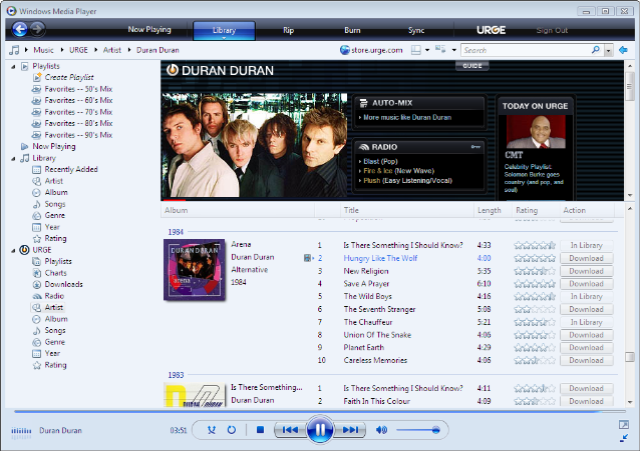
Since installing Vista RC1, I decided to check out URGE, the new online media service from MTV. Since I’ve always been an “I need to own the CD” kind of guy, this is a bit of a change. Also, I’m not a real big music person – that’s my wife though!
The recurring monthly charge makes me think a bit as well – again, mostly because I’m not into music in a big way. I like what I have, a few dozen CDs from my favorite groups so I have my favorite tunes. By the way, they’re called “oldies” now – I’m not that old am I? Guess that makes my dad’s Beach Boys and such “classics”; which sounds more, …well, classy – guess I can’t poke fun at dad’s oldies any more.
Anyway, being the frugal fellow I am (read: cheap), I signed up for the 14 day free trial.
I have to admit right now that I’m impressed. The full URGE library is available, along with numerous videos, many I haven’t seen in over a decade, and other great music-related info and services.
As far as price goes, I’m on the fence. Its $10/mo. and $15/mo. for the ability to sync every track to a MS-based media player. They’ve got annual fees that end up giving you a 2-month freebie. I’m going to look into a subscription – mainly because Amy would make huge use of it.
I’m warming to the idea of a subscription-based model for media consumption, as long as I can really use it without running into the DRM enforced walls. As I don’t intend to pirate the music, I’ll be disappointed to find the limits, unless MTV and MS have done their homework on this area.
@MAC_Arms Pay taxes when you make your money, pay taxes when you spend your money, pay taxes when you successfully invest your money, pay taxes when you save enough taxed money to afford a house, pay taxes to live in your house, pay taxes when you sell the house that you paid taxes on to
Yup, taxes are criminal and we need serious reforms. I've always said that if you want to see a tax revolt, make withholdings illegal and have Americans write a tax check every payday. They'll revolt for sure. You don't miss what you never had.
Sen. @berniemoreno says voter ID and proof of citizenship are simply common sense.
“We’re talking about a very low threshold — identify who you are and prove you’re a U.S. citizen when you register to vote. I think we’re getting closer to