It’s time has come, or passed rather… at least for me. I’m sure I’ll cross paths with my favorite email client and PIM in the future. I’ll either have a change of heart (unlikely) or a future client will insist that I use it for internal email at their location (very likely).
For all those anti-Microsoft folks that love to hear things like this, I simply have to say that it has little to do with the product. It does have everything to do with the way I work. As I transition much of my work online, I’m finding that I use more than one or two computers. Since it’s much harder to sync all the data on all these machines, and the fact that I simply can’t do this on some, leads me to world of cloud computing.
This is nothing new for me, I’ve been an advocate of leveraging the cloud for years, but it’s the first concerted effort to simply migrate my data and shift my app usage online. Yes this includes office productivity solutions as well. I’ll be using a lot of both Google Apps and Zoho Office. Both have their strong points and I’m aiming to leverage both for different reasons.
I’ve got most of my data on either XDrive or SkyDrive for differing reasons, and use Box.net as well for some always accessible drivers, tables, code snippets, and such.
I’ll keep MS Office Pro installed, but it’s use is limited to supporting my clients – nothing more. So join me, if you wish, and see how well this works out! I’ll share my frustrations and my wins equally with you.
Have you been thinking of doing the same? What are your directions on how you work, looking into the future?
A few of us in Minneapolis met up to share ideas and thoughts on consulting and contracting. Thought I’d share a quick thank-you to @dydimustk, @davehuston, and @taulpaul – all from Twitter btw! Mobile post sent by Rick Mahn using Utterz. Replies. mp3
So for all you T-Mobile owners out there, I’ve found a few fun ways to give your device a new lease on life. It’s true that we are all getting tired of the lack of 3G service by T-Mobile, or maybe the “long in the tooth” look & feel of Windows Mobile 5 and the ridiculous T-Mobile theme that shipped with the MDA.
It’s a good thing too, because right now there is simply too much turmoil in the mobile market to pick a good successor to our trusty little devices. What are the options? Go back to a “dumb” phone? Switch to a non-touch screen Smartphone? Go the Nokia N-series route? Spend upwards of $800 on an HTC unlocked device? Bite the bullet and jump to AT&T and the iPhone?
Well I’ve got some great ideas and news for you that will help pass the time waiting for new devices, and answers to some questions that will make that aging phone more productive and fun.
First, lets start with the one thing that we simply can’t change: 3G. No, there is no way at all to fix that. But there are workarounds: T-Mobile Internet & WiFi HotSpots. I’ve had the full unfiltered Internet & HotSpot service from T-Mobile for nearly two years and have used it extensively. Mostly I’ve used the WiFi with my laptop and really like knowing that I can hit any Starbucks Coffee location and enjoy decent connectivity. It used to be $30/mo. but they changed the pricing on that a few months ago to $20/mo. for customers with a voice plan. If you combine that, T-Mobiles GPRS/EDGEand some free WiFi spots, it’ll cover a lot of a person’s daily stomping ground.
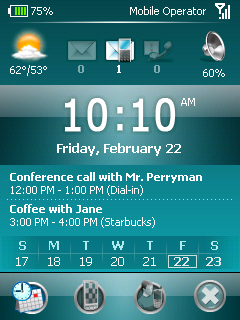
Second, we’ll talk a bit about the user interface. It’s tired, it’s old, it’s boring. The iPhone sure has a great UI. But have you noticed the various 3rd party solutions to this problem? There is the PointUI Home interface, HTC’s “Touch Cube” interface for select HTC devices only, and recently SPB Software House’s Mobile Shell. I’ve chosen this piece of software because of the simple elegance of it, the functionality, and the fact that it’s really darn stable and doesn’t slow down the device. In addition I’ve picked up SPB Pocket Plus which, among other things, adds a touch-based scrolling action to the native applications in Windows Mobile. Too cool! These simple additions make the device much easier to use, easier to look at and FUN!
Third on the list has to be tunes. For this I was recently surprised that the Rhapsody Music Service recognizes Windows Mobile devices as “Play’s For Sure” devices. That means that it can sync any of their DRM’d content to the phone. Sure.. I’ve been an advocate of non-DRM for years – still am actually. However, I’m just not willing to part with the thousands of dollars that I’d have to spend to get all the music I want to choose from. With Rhapsody, I can spend $15(US) and be able to sync any track from their over 4 million strong selection to my MDA. Slip in a larger 2GB (maybe a 4GB…?) miniSD card and I’m pretty darn happy on this front.
So, no it’s not a new phone, nor does it bring a ton of new functionality. But with these hacks, tweaks, and upgrades, it doesn’t compare badly with newer phones. After all, it’s really the services and experiences we’re after. And these darn things aren’t cheap! I made a $400(US) investment in this phone over two years ago – and to think that I still am getting value from it is amazing. What’s more, I keep finding ways to answer my immediate needs demonstrates that the HTC Wizard will long be remembered as one of the most flexible and adaptable phones in mobile device history.
Come on! Share some of your hacks and upgrades in the comments below. What else makes this device still viable in the face of recent competition?
But with great software, usable keyboard, and highly useful mouse, it still isn’t a great performer, and is missing that full browser experience that is crucial to a web worker.
The biggest thing about either of these devices is realizing that they are an access terminal, or “Cloud Computer” in popular terminology. If you can get away from the idea that you need to have serious storage space, keep your entire music library, or have every conceivable tool you’ll ever need with you at all times, then this type of device will work for you.
In fact this is not limited to these two devices – add in the Nokia N800 series devices, UMPCs, MacBook Air, Everex Cloudbook and other such capable systems. The idea is that you are connected to the Internet (the cloud) and the majority of your data and tools are located there – accessible from anywhere on anything.
The biggest plus for solutions like the Eee PC or Everex Cloudbook is that they run real, modern operating systems, have very useable screens & keyboards, and rely on fast connections like WiFi. Solutions like my HTC Wizard and related devices are handicapped mostly by screen & keyboard size.
Even so, for the common, basic tasks I have used that T-Mobile MDA for over two years, written many blog posts, performed hundreds of Internet activities, along with the usual meetings, notes, calls, and pictures. But I needed to carry three pieces of equipment to get a useable mobile access terminal – something that the Eee PC class of device is putting in a 2lb. clamshell that is no larger than a modern paperback. You seriously just grab it and go – there is nothing more to think about.
I’m curious on your devices and feedback though. What are your thoughts? Have you tried an Eee PC or similar devices? Have you used a Windows Mobile based device like the HTC Wizard for the same function? How successful has it been for you? What would you recommend to others?
Oh yeah, wondering what device wins in my book? The Eee PC. Cheers!
Hello there to all my Twitter budz! As I mentioned yesterday, I’m sharing all the Twitter users that I know are going to be Tweeting from SXSW next week. So, if you’re not following them now, you can now! Also, these are all really great people with a lot of intelligent commentary – and a lot of great wit as well. 😉
Like many, I’ll be following these fine folks, and others that I’m not aware of that’ll be there, for as much play-by-play that they have time to share with us. If you know of more people that’ll be there, or if you would like to be added to the list, please drop me a line on Twitter – you can find me there at http://twitter.com/rickmahn.com.
UPDATE: Connie Reece pointed out that there is also a wiki that many Twitters that are going to SXSW have left their links on for people to follow! So head over to http://sxswtwitter.pbwiki.com and check it out.
UPDATE II: I noticed Pistachio just Twittered a link that I hadn’t seen before as well: http://www.sxswbaby.com. It’s a blog dedicated to SXSW, loaded with information specifically for the conference, it’s venues and more.
It seems that Google itself has released a useful little utility that will sync your Microsoft Outlook Calendar with your Google Calendar. No, I don’t think hell has frozen over, but it’s gotta be colder there anyway.
You can read more on the utility over at Google’s “Calendar Help Center“. Or you can skip the reading and download the tool here.
See, now this complicates my choice to wean myself from Microsoft Outlook!


 So for all you T-Mobile owners out there, I’ve found a few fun ways to give your device a new lease on life. It’s true that we are all getting tired of the lack of 3G service by T-Mobile, or maybe the “long in the tooth” look & feel of Windows Mobile 5 and the ridiculous T-Mobile theme that shipped with the MDA.