I’ve fallen into the trap again. Allowing myself to loose focus on getting things done around here and writing for my blog. The last couple weeks of May and the first week of June allowed me to get a lot done around here and start laying groundwork for moving forward.
This week I blew it. I let work get in between myself and my goals. Sure, getting paying work is an important part in attaining those goals. However, it really smarts when a person let’s it completely absorb all your time. I did that this week, and have little to show for it but inspiration for the weekend.
No, I don’t have grand ideas to make up for lost time, instead I’m simply picking up my plans that I think I left in the front seat of the car under an empty soda can and a bag of stale chips. Oh, never mind about that 😉
Honestly, I find it funny how easy it is to repeat past mistakes and not realize you’re doing it until you can look back over time and see where you missed a step. There are many steps still ahead, so I’ll just keep walking down the path I’ve chosen. See you this weekend!
The fourth SMB in the Twin Cities of Minneapolis & St. Paul, Minnesota is scheduled for Wednesday, June 11th. Sure, that’s tomorrow and I coulda/shoulda/woulda posted about it a week ago, but decided to let the posts here, here & here do their work.
We’re hosting the event at Concordia University in St. Paul for the second time, as the facilities work well for our group. Though I do believe there’ll be some suggestions to shake it up again in July.
I can’t wait to see what directions the conversation will go in this meetup tomorrow. There are always such great ideas that the group never has enough time to really cover them all. We’re lucky to have a bunch of outgoing people, ready to bring their opinions & perspectives to help others. It makes the meetups more valuable that way.
Agenda? Oh yeah, we’re trying to have a little more structure – at least for starting points of conversations.
8am to 15am: Meet & find seat
8:15am to 8:30am: @Desaraev from Twitter will be presenting “Social Media Roll Call”
8:30am to 10am: Conversation Topics
Co-Working (shared office/work space for web/home workers)
What are you reading? Social Media book recommendations (i.e. Here Comes Everybody, etc…)
Have you been Plurked yet? Are there too many Twitter wannabe’s?
Social Media Club (Minneapolis) – Connie Bensen
So, we’ll have another great breakfast – hope to see you there!
Awhile back, I’d started a list of "101 Uses for Twitter", but never seemed to get past 27 for some reason. Of course, it had been last autumn since I brainstormed on it. While I don’t think that I personally could come up with 101 uses, I’m sure there are many more than that.
So I thought about this again for awhile this morning and did think of 50 uses that I’ve seen or participated in. So here is a list of 50 uses for Twitter, I’m thinking of more as I write this, so maybe there is a chance at that "101" post sometime.
Keep in touch with my Twitter peeps friends
General news item links
News & links on my industry or area of interest
Fast answers to quick questions
Professional networking
Links to nearly everything
Marketing
Personal branding
Corporate & product branding
Haiku’s
Making friends
Feel "plugged into the web and it’s various personalities"
Replacement for instant messaging applications
Chat tool
Promotional tool for my blog
Providing new reading opportunities
Fun stuff!
Meeting new, interesting people to communicate with
Collecting links
Finding sites related to social networking
"To listen in on my contacts rants"
A web worker "water cooler"
Micro-blogging
A personal "techmeme"
Lightweight text broadcasting tool
Easy way to annoy your spouse
Promotional tool for my brand
Ranting
Idea generator
No-cost non-profit announcement system
Bring a sense of community to your home office
Tracking status of friends
Status message generator for other social networks
Frustration generator (at least when it is down)
Thought publisher
Promotional tool for my organization
Following public discussions
Travel guide
Controlled discussion between friends
Uncontrolled discussion between friends with viewers
List generator
Meeting agenda generator
Coffee shop locator
People search
Promotional tool for my company
Product reviews
Trip planner
Backchannel for events
Feedback generator
Authentication mechanism
So what are you uses for Twitter? I’m sure I didn’t capture them all, so add your ideas and things you use Twitter for below.
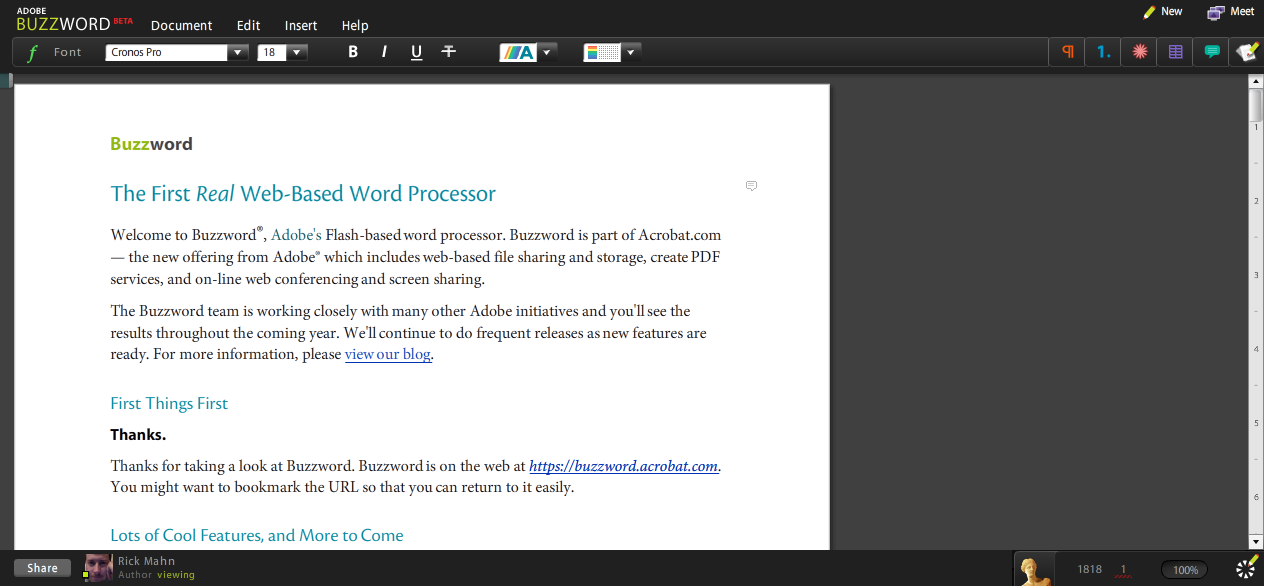
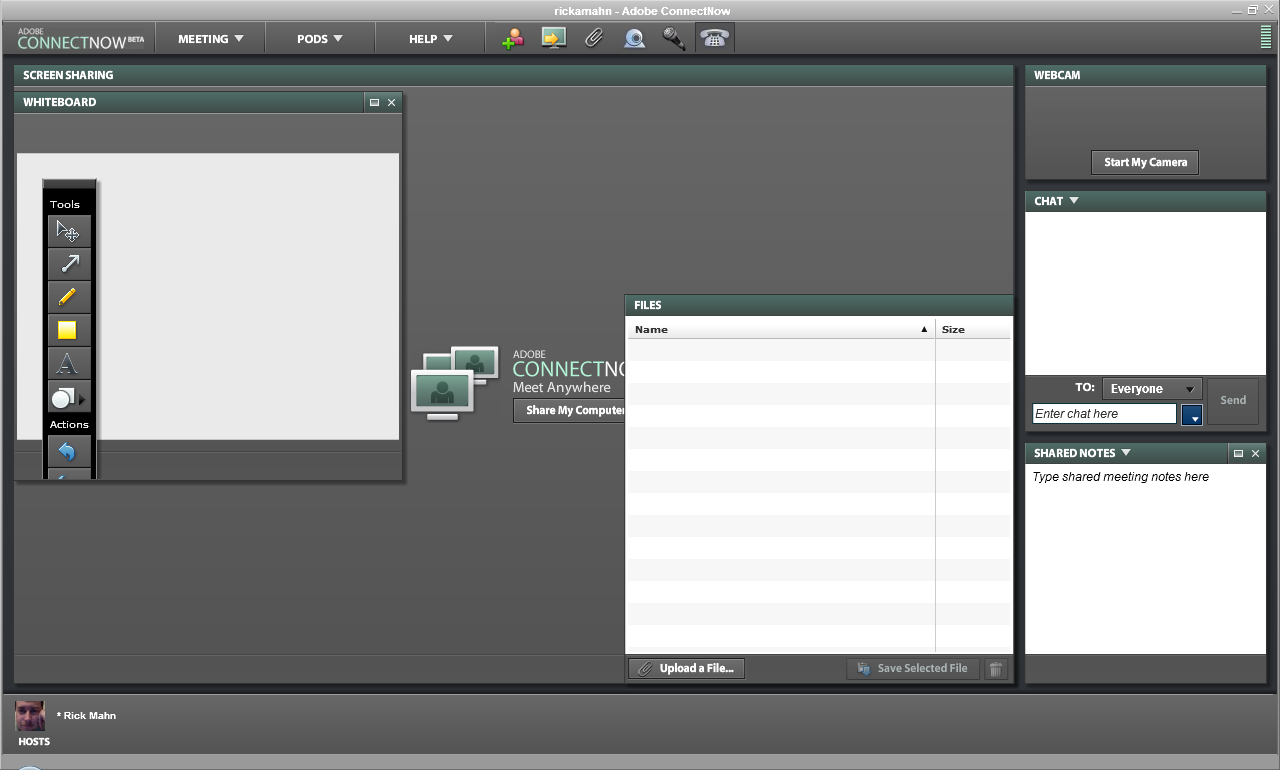
Just a quick weekend look at Adobe’s new "online office" product – Acrobat.com. At least, that’s how I found it referred to in some of the news bits today. Overall I was impressed with the first release of Adobe’s Acrobat.com efforts. With a slick, Flash based interface, it has good performance and is visually appealing.
They seem to be starting out with some good features, but are missing many. Zoho is closest to providing an online office suite that compares anywhere near Microsoft Office. Adobe is starting out with a word processor, document sharing ability with a generous 5GB of space, a document to PDF conversion tool, and a really nifty web conferencing application.
The word processor, called BuzzWord, is what you’d expect. It has the basics and is similar feature wise to Google Docs. PDF conversion is straight forward, you can upload a doc to convert and it saves the resulting file in the My Files applet. File sharing is accomplished from the drop-down context menu and provides the ability to embed the doc into a site.
The most impressive app included here is the web conferencing, called ConnectNow, which has features similar to WebEx. Adobe provides each user their own room, assigns a conference phone number to it, allows for desktop sharing, meeting notes, group & individual IM, and WebCasting with an optional web cam. Good stuff.
Just a couple bullet points:
Look & Feel: Wow – the Flash based interface is impressive
Consistency: Needs some work, changing applications launches too many windows
Integration: Very little between "applications"
Functionality: Depends on feature – some are quite rich, others very basic
Features: Document sharing, Word Processor, PDF Conversion, Web Conferencing
Overall it’s a good start. There is a long way to go to compete evenly with Google Docs & Spreadsheets, but then Google doesn’t have a web conference tool. It’s not going to compete with MS Office, or any of the others for some time. With that said, however, if you want to convert some documents to PDF, host documents that you can link to in email or from a website, or a decent free web conferencing tool, it might be a good adjunct to your current solutions.
Wow, what a wild ride the last few months have been. I’ve been planning to refine the direction of my blog and revamp the appearance for some time and it’s finally completed!
Well, it’s almost completed – I’ve got a replacement for the About page almost ready to publish, and I’ve got one last page that I’ll add a little later. Seems I just can’t get it to come out quite right in the past week while working on other things – so I’ll get to that real soon.
Direction
The great part is that I’m refining my direction. Since I’ve come out of corporate, with a strong background in information technology, I’m going to focus on helping those organizations with social media. I’ve changed the description of the blog to "social web & the enterprise". I believe that to better describe the direction that I’m going.
Friends
First, I really respect a number of bloggers for their work & influence on me. So, instead of the old blogroll, or a list of links, I created a new Friends page. This page is people I have come to know, respect, learn from, work with, and I wanted to do more than just link to them. You’ll find a description of each blog and a thumbnail of their landing page.
Resume
Also page that can now be found in the top navigation area is the Resume page. I’ve had a variant of this Social Media Resume up for about 9 months, but never advertised it on the blog. I’ve revamped a number of pieces of the page as it used to be a completely custom HTML page forced into a WordPress theme template. Now it fully fits the theme, with a special resume.php template that allows different sidebars and such. Much better. I’ve pulled the video that I had on it, but will replace it with another one to fit the direction of the blog shortly.
Advertisement
You’ll also notice that all advertising save two things have been removed from the blog. While I make enough to pay for hosting, I believe that the ads detracted from what I’m here to accomplish, so they’re gone. The two items I mentioned that remain are badges for Personal Branding Magazine, and for Avatar Consultants. Their of personal interest to me, I’m involved in writing for one, and the other is my consulting firm.
Nowhere But Up
So if the picture in this post didn’t give a hint, my motto as I revise my direction and enter a new phase, is that there is nowhere to go but up. Join me as we bring the benefits of the social web to organizations of all sizes. Come along and help individuals realize the power and strength of their brand. Let’s make each day the best it can be!
I want to give a special thank you to Mykl Roventine for patience, ideas, and a great design – I wouldn’t have gotten this completed without his work. Thank you.
Got feedback? I bet! Don’t hesitate to leave your thoughts in a comment below.
Just want to share a bit of news. I’m in the process of updating the theme & design of the ol’ blog tonight, so if you see anything odd, broken, or inoperable it’s probably being worked on. A teaser thumbnail of it running on the development system is included just for fun.
However, if you want to let me know of specific things that aren’t working and such, please feel free to do so. You can ping me on Twitter (I’m @rickmahn) or via email (rick {at} rickmahn.com).
This is pretty exciting for me as I’ve been planning on a new design for several months. I’m very glad to have had Mykl Roventine heading up the redesign based on a free theme called WP Premium. The look & feel is clean and simple and suits me quite well. A big thank-you to Mykl for the great work.
That’s it for now, I’ve got a couple of things to finish up before flipping the switch so I’m off to get those done! Talk soon folks!