This was a frustrating experience, but in the end worked out like it should. I have to admit that the actual migration by FeedBurner to using my Google account went well, and the existing feeds redirected to the new FeedBurner/Google domain that handles them.
The biggest issues for me were the longer-than-expected reader-count anomaly, and the not-so-exact steps involved to redirect the “MyBrand†URLs to the new feed domain.
Finally, nearly a week after move the feeds over, the reader count is approaching where it used to be. One or two days eh? HA!
Also, it took a bit of digging to find out the real trick to re-enabling the “MyBrand†configuration for my FeedBurner account. It after getting DNS changes made, and validating the FeedBurner MyBrand configuration, it turns out that you should also disable the service, then re-enable it. What’s with that?
Anyway, the feeds are finally redirected correctly, both existing ones that folks were using and the links here on the blog. Sorry for any strange feed behavior in the last week – I totally didn’t expect it to happen.
It’s surprising that something as portable as the T-Mobile G1 and powerful a platform as Android can be so useful. Perhaps it shouldn’t be, but I’ve been using my G1 as a mobile internet device more and more often.
The biggest issue as many will point out is power, and the G1 is worse at power consumption and management than any other device. On the other hand, the abilities simply outweigh the power disadvantages that it has. Besides, keeping a charger (AC, USB, and auto) at hand eliminates that issue for the most part… minimizes it really.
Since jumping from the Windows Mobile camp to Android, I’ve noticed that my phone is fun & easy to use again. It’s more powerful, simply because I use it for everything rather than explain how useful it can be as I did with Windows Mobile. The software is fun too – many more new ideas and attempts to do different things than the staid, boring software selection that WinMo had when I last looked (it’s changing I know).
Anyway, just wanted to drop a note about how much I’ve come to depend on the G1, much more than my MDA that stayed by my side for 3 years. Even though I believed that to be a powerful, useful device, Windows Mobile can’t hold a candle to Android (or the iPhone) at this time. The phone is fun again.
Well, I finally got around to moving my FeedBurner account to my Google account. Not sure if I did something wrong, or if I just need to wait a few days. It seems that I can’t see any items in my feed now, as I monitor it in Google Reader.
Has anyone else done this and found the same issue? I know I’ve probably missed something somewhere. I’ve got the “MyBrand†personal domain settings enabled, and updated the DNS CNAME records for my domain last night as directly by the MyBrand settings page on FeedBurner.
So far, it’s no go, but I wonder if the CNAME is pointing to the right URL. In the email I got after the FeedBurner –> Google migration was done, it showed a different URL for the feed. Namely, http://feeds2.feedburner.com/Rickmahncom – which is different than the rickmahn.feedproxy.ghs.google.com that is listed on the MyBrand page.
Suggestions welcome, but I’ll probably be testing different settings this evening. Sorry for any inconvenience that this may cause.
So it’s the end of another year. As such, I wanted to take a minute and put my plans & goals for 2008 out there. I’ve not done this one before, but thought I give it a go this year. Much has changed and I have some directions that I want to follow in 2009 that I neglected in years past.
Writing – Blogging
I’m planning on making a return to a regular blogging schedule after a bit more than a year of a more random approach. The reason for this was partially work related, but also from a lack of direction in the Fall/Winter of 2007/2008. This will include the review of a couple other blogs I have – see if I still have the passion & interest to continue those, or if I should end up selling them off.
Writing – eBooks, Newsletters
Ah… yes, there were two aspects to the writing bug this time around. I also am planning to move forward with some eBook projects and a possible Newsletter in 2009. I’m not sure when exactly this will take place, but will be working on the planning in January. The eBook topics will relate to personal branding, the social web, information technology (& social media), and probably how many of these relate to the enterprise. I’m thinking hard on these lately.
Events
Social Media Breakfast – Twin Cities (@SMBMSP on Twitter) has been a great success here in the Minneapolis & St. Paul area, and I plan to continue evolving our local version. It will remain a low or no-cost event. In addition to this fun monthly event, I’m planning on working some one-off special events and possibly an annual event. Whether those are a summit, retreat, or un-conference style I’m not sure yet, but I do have a few concept ideas that I want to expand on. I’ve found that I really enjoy helping people connect, and thereby connecting their business or career needs with resources in the local community.
Online Income
2009 is the year I get serious about increasing online income. By focusing energies on new ideas and business models for my consulting services I plan to make the transition this year from a senior technologist role to a business & customer communications role. The end result will probably be something different, but that’s the fun of a dynamic, fast-paced industry… it’s constantly changing.
Direction
The next few weeks of this year is also the time I’m going to be taking to reassess my career direction. Am I really pursuing the dream, or have allowed myself to get sidetracked and mired in the mechanics of the mundane, again? This is a crucial piece of the puzzle, as it feeds into everything else. Without direction, none of has have a clue as to where we’re going.
I’ve installed Dan Zarrella’s new Tweetbacks WordPress Plugin today, and will be monitoring it to see how well it works out. I’ve seen a number of folks over the last week taking a close look at this new idea, and have always been trying out some of the cutting-edge Twitter tie-ins and tactics.
Have you tried out this new plug-in? What do you think?
So, with the first public beta of Windows 7, I thought I’d share a few of my initial observations and opinions on the latest version of Microsoft’s flagship operating system. My testing of Windows 7 is taking place on my production laptop – an Acer Aspire with a Intel Core Duo 1.8GHz, with 3GB RAM based on the Mobile Intel 945 Express Chipset that many “average” laptops are built around.
Having been a user, advocate, and professional using Microsoft’s operating systems for the last 20 years, I do have to admit that I can come across as a “fan boy” at times. These observations may be just another example of this tendency, but I do try to be as impartial as I can (Vista rocks), er… sorry.
😉
Performance
I’ve only been running the Windows 7 Beta Customer Preview for about 32hrs at the time of this post, but I do have to admit that performance is better than Vista SP1. I haven’t run Windows XP on my laptop, so I can’t really compare it well with that OS. Simply put, it does appear to be a better performer than Vista.
Comparability
Here is one area that a few people will get a chuckle, or maybe help me figure out my one issue. Most everything is working great, except… Outlook 2007. I had to run the application compatibility troubleshooter to figure out what was wrong. I ended up setting the compatibility to “Vista” to run it. I’ll come back to Outlook later this week to investigate the issue more. Other than that, I’ve had no problems with 3rd party apps and utilities from large and small vendors.
Windows Sidebar/Desktop Gadgets
IS GONE! This is probably one of the things that helps performance in my opinion. While I liked the utility of the Windows Sidebar in Vista, the extra screen real estate and the processor cycles just for the Windows Sidebar ate up RAM and performance.
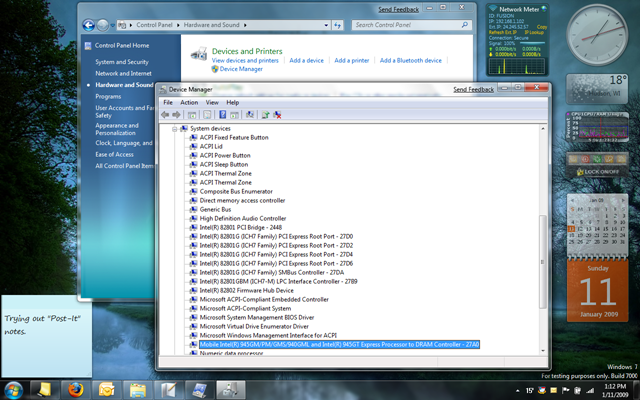
Luckily, this isn’t the case in Windows 7! The gadgets that were helpful, useful, or just plain fun in Vista’s Sidebar now run right on the Windows 7 desktop. This is a great enhancement, and one that I was looking forward to. You can see a few Vista Sidebar gadgets shown running on the Windows 7 desktop.
Peaking
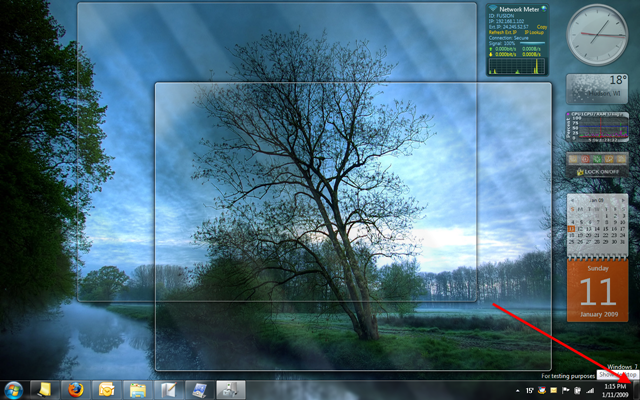
Peaking is an uber-cool enhancement to Windows 7. Simply hover it the absolute bottom-right corner of the screen (shown in the 2nd screen capture below) and whatever windows you have open become transparent so you can see the desktop. Nifty to check the time, weather, or other gadgets you have on the desktop.
There are many great enhancements to the UI in Windows 7, and Microsoft seems to have focused on just making it all work together simply and easily. Of course, I thought that of Windows Vista as well, so take it for what its worth.
I’ve not had a chance to perform any significant testing that is network or file-system related. Areas that Vista had real issues on it’s initial release. I’ll be watching and testing for those as time goes by, but the first day has been a fun experience.
Since Windows 7 is running on my personal production laptop, I’ll be using it daily for all my usual tasks, and will probably drop a post when I run into things that are interesting or troublesome. I hope this gives you an idea of where Windows 7 is at so far. If you’re interested in experiencing it, I do think it’s stable enough for the average IT pro to use on a daily basis as you’d probably know what your getting into anyway. Good stuff.
Ever notice that despite being a vanishing global minority at 8% of the population, white majority countries are the only places where “diversity” is pushed?
-India is 100% Indians -China is 91% Han Chinese -90% of Saudi Arabia is Arab -85% of Africa is black
🚨 BREAKING: In a MAJOR mask-off moment, Senate Democrats just REJECTED legislation that would've required photo voter ID and banned stock trading for members of Congress, 53-47
100% OF DEMOCRATS VOTED "NAY"
LET THAT SINK IN. Democrats just voted for VOTER FRAUD and INSIDER