Opera, the other alternative browser (and a darn good one) discusses how mobile operators are making money using the Opera Mini browser. Mini was designed specifically for mobile phones, their small screen, and their keypad. Their press release yesterday gives a lot of detail on who is using it and how its being used.
Russell Beattie has a nice post on this topic as well. By the way Russ, nice new layout – kind of minimalistic, I like it!
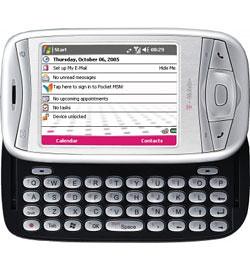
So I’ve had the T-MobileMDA for about a month now and can give a good user-review of what I think. I must confess up-front that I’m fond of Windows Mobile, T-Mobile and HTC-built devices, so I’ll do my best to be objective. 🙂
Ultimate Device? My purchase of the MDA has been a long story of wishing and waiting. My wife has put up with my writing feature wish list items with patient amusement. Muddling through delays, and finally the delivery of my *perfect* device. My requirements for a converged device have been met by the MDA. Period.
Battery/Power Right out of the box I was not impressed with the battery performance. As with all Li-ion rechargeable batteries (this one is a Sanyo 3.7V 1250mAh Li-ion), it needs a few charge/discharge cycles to really get to full capacity. The first few days, I barely made it without a recharge. Two weeks later, I’ve made it through two days in a row with out a charge – twice. Now keep in mind that I’m checking 5 email accounts every 15 minutes, and have SBSH Pocket Weather updating current conditions every 15 minutes, and 14 bitmap images every 30 minutes. I use the phone portion of the device around 30 minutes a day.
Syncing ActiveSync 4.1 (AS4) is a great improvement over previous versions, and I’ve had no problems with it synchronizing my data. Now with that said, I must point out that the change in how AS4 connects over USB does have an impact on syncing when you have a personal firewall. Microsoft has published an ActiveSync connection troubleshooting guide that can help you out if your personal firewall software is blocking the sync traffic.
Performance Hmm, this is a mixed bag for the MDA. Personally, I have issues with the performance, coming from an iPaq h4155 that had a 400MHz processor, I notice a drastic difference. My usage is different than most however. My device runs 5 Today screen plug ins round the clock, along with a task switcher, and email client (see the list below). All this (along with a nice spiffy skin & theme), slow the device considerably. Without this added software, it actually performs quite well! The slower processor is of course much easier on the battery. My wish would have been to have at least a 312MHz processor in the device and a slightly larger battery – but that would just be nit-picking, I’m very comfortable with the performance.
Wireless The wireless functions of this device are exceptional. Yes T-Mobile only has GPRS/EDGE services, but I’ll have to tell you, coming from a 42K (maximum) connect speed on my Nokia 6600 (using GPRS) to the MDA’s EDGE speeds is a wonderful experience. I’ve actually hit 200kbps, and regular checks every few days in different locations have been in the 128kpbs to 170kbps range – very acceptable for my usage pattern. Your mileage and usage patterns may vary – but I hooked on the EDGE service alone. Just make sure to get an all-you-can-eat data plan!
Bluetooth occasionally gets a workout with syncing the device, and when taking notes on my ThinkOutside Bluetooth Keyboard and Mouse combination. This has to be the ultimate mobile office as far as I’m concerned. I can get on the ‘net, do my email and take notes all with pocketable devices. Fantastic!
WiFi is, as you would guess, a great thing to have on the device. I’ve not used WiFi very much on this device because EDGE service in my area is THAT GOOD, it completely eliminates my need to get to a hotspot.
Graphics Actually, I’ve not much to say on the graphics of the device. They perform adequately enough that I never gave it much thought. While the MDA does not have a dedicated graphics chip, it works very well for me. I’m easy to please in this area since I don’t play any games, and really only push the device while watching video (which is streamed from my home PC via Orb).
One-Handed Useability Out of the box, one-handed usability suffered as all PPC Phones have little in the way of simplicity like a phone does. Remember, PPC is a general-purpose computing device, capable of Audio, Video, Games, Personal Information Management, Web Browsing, News Reading, Email, Instant Messaging… the list goes on. With that being the case, the MDA (and all its cousins) need a little help in this department.
This is where I turned to the use of a program launcher on the Today screen. My choice (long ago) was iLauncher by SBSH software. With a Today screen program launcher, you can easily have a whole list of applications in icon form that you simply tap with your thumb. This makes it easy to switch apps, and start new ones.
In addition to the program launcher, I highly recommend remapping the physical buttons on the device. Two are all that is really needed. Since you can put a link to email and the browser on the today screen with a program launcher, you can remap the Mail button (upper left) to open the Start Menu (also in the upper left corner), neat huh? The other one I immediately remapped was the Internet Explorer button in the upper right corner. Since the “OK” button is in the upper right corner of the screen, this seemed appropriate to map here. Those two button re-assignments bring a whole new level of usefulness to the device. Even if you didn’t have a program launcher on the Today screen – the shortcuts are right on the Start Menu anyway.
More can be done in this area, but it really boils down to personal preference and working with the device to see what you like. Google a bit on MDA, Wizard, Prodigy, Qtek 9100, iMate KJAM, and 8125. These will turn up endless amounts o f customization options, tweaks, and ideas for you. Durability I’m surprised by the durability of the device, yet I keep wondering when the sliding keyboard will not “catch” any longer and simply slide in and out in my pocket. Yes I simply put the device in my pocket instead of a case on my belt. I just don’t like cases that make it harder to get to my device, and I’ve often knocked many lesser mobile phones off my belt onto… pavement and other hard surfaces. So, I’m rather careful with my devices in recent years.
My Customizations Here is what I’ve done with my MDA. While I own much more software, I’ve been rather selective on what got installed. My main goal with software on this device was to augment its mediocre one-handed operation. I also installed software that I found useful, so here is the list of currently installed software:
Summary This device is exactly what I’ve been waiting 4 years for. Ever since the first announcements of Smartphone and Pocket PC Phones, I have wished for a pocketable, powerful, all in one device. The MDA is that device. Sure, there are faster processors out there, VGA screens, and EVDO or HSDPA “wireless broadband”. But I’ve got the device I’ve been waiting for – you should check it out to see if it would work for you!
Pros: Compact, powerful functionality, stable system, tons of features, built-in keyboard, lots of wireless options
Cons: Heavy for its size, not much included software, one handed usability needs work
Reviews Intro: Now I mentioned NewsGator to a coworker awhile ago and the first question they couldn’t wait to ask is “You mean that spy ware company?”. Of course NewsGator has nothing to do with the old “Gator” spy ware stuff from many years ago, but it’s curious that people still relate the name.
At any rate, this review is one in a number (not sure how many) on free RSS Readers. There will be some online products, some offline products, and some that cross the line using features of both. Along with NewsGator Online, I’m planning on reviewing NewsAlloy, Pluck, Attensa, and as many other free news readers that I can in the next few weeks. At work, I’ve got a chance at a large team meeting at the end of April to present the virtues of news readers, and I figured I’d share that information here.
About NewsGator NewsGator has a number of feed reader products – NewsGator Online, NewsGator Inbox & FeedDemon for Windows and NetNewsWire for Macintosh. NewsGator Online is a “Web 2.0” product that uses some AJAX features in its interface. The design is similar to other online news readers where your list of feeds is on the left and the content on the right. It does not use panes or any kind of scrolling system, so your feed list on the left will move up as you scroll down in the post list of the feed.
Features Since the product is online, you don’t need to download and install any software, set any proxy or port information, or use your bandwidth for synchronizing data. In addition, you can use the online account to sync your feeds with one of the previously mentioned “pay for” software choices above. I’ve got a coworker who uses the NewsGator Inbox and is very satisfied with it. You can import your feeds into the system and start reading right away. While the free web version does not allow you to change the update frequency of the newsfeed, the standard sync frequency seems to work fine for the average reader, however, hardcore RSS junkies will miss being in control of synchronization times.
In each post section, there are three little icons and a set of five gray stars. These tools allow you to mark individual posts as read, add the post to the “Clippings” folder, and the ability to forward the post to an email account. The stars allow you to rate the post. These ratings will flow back to the original source (if they have a NewsGator account) and also help to show other users online determine if this feed/post is of value.
The My Clippings folder is quite useful for “clipping” a favorite post and storing it for later reference. You can also syndicate your My Clippings folder in RSS, and make it available to the public. Its kind of a neat way of saving important posts from a variety of feeds.
The AJAX interface of NewsGator Online worked well in Internet Explorer, but worked better in Firefox. I believe the key on this is to have a current Java VM as AJAX makes significant use of JAVA, and my IE6SP2 install only has the limited MS Java VM installed. Some of the functionality I missed using IE6 were right-click options. These range from marking items as read, deleting, moving, expanding/collapsing, Unsubscribe, and “visit site”. These right-click menu options worked wonderfully in Firefox, and I’ll be installing an updated Java VM on my main home machine to test this out.
Additional features allow you to add a Blogroll to your blog from NewsGator Online, supply an OPML URL, add a NewsGator auto-subscribe link on your blog, add NewsGator ratings to your site, and offer API options to developers. The knowledge base was consistent and easy to use. Structured in a hierarchical format, the articles were easy to read and the system was quick. The customary FAQ was easily found and contained helpful starter how-to’s.
The one downside to the knowledge base, was that once deep within the system, there was no easy link at the top or bottom of the otherwise cleanly designed page to go back to the “reader” view. A few simply “back” clicks get me to where I wanted, but a simple “Reader” link would be better.
Performance This online news reader was rather quick. I’ve seen faster ones (Attensa for example), but
Dislikes I actually like this product and may keep my free account, but I did see some strange behavior when marking posts as read. When you click on the folder instead of expanding the folder, then mark the feeds as read, the folder closes. If you expand the folder, then marking fields in a feed as read does not close the folder. This makes sense, but when you click on the folder it appears to expand the folder and allow you to click on feeds, so it is a little confusing.
Summary
To finish up, I find that I like the speed, flexibility, style and ease of use of the NewsGator Online product. Here’s how I rate it (1 being low and 5 being high).
Pros: Good performance, adequate features, easy to use, nice blog add-on options, neat custom “My Clippings” folder
Cons: Some odd behavior in Internet Explorer (Java related), can’t set sync schedule, can’t export feed list.
UPDATE: I have to take back what I said about IE6 – at least for some installations the same full functionality will be available. After re-building my day-to-day system with a clean install of XPSP2, I find that all the AJAX functionality in Firefox is also here. Must have something messed up on my other system (sorry).
UPDATE2: While I was unable to find an export function, Jonathon McDougall from NewsGator recommends the following tip to save your OPML. Enjoy!
Log into your account and go to My Settings | Edit Locations
Under each location you will see an OPML link. You can choose to make the URL to your OPML public, or if you view your OPML online, you can save it to a file.
Thank you Jonathon!
UPDATE3: Check out the review of NewsGator Mobile at Arne Hess’ the::unwired!
Interesting – MSNBC is offering a new mobile service specifically for Windows Mobile devices. It kind of surprised me that all the currently available Smartphone and Pocket PC Phone versions are listed on the site. Did I mention – its free?
To sign up, you simply select your device, enter your phone number (which is only used to send you a URL via SMS) and then download the client software (~700k). The service offeres up to the minute news, picture news, news videos, and clips of the Today show. Seems kind of neat.
Kent Newsome talks about having a dry spell in his blogging, and compares it too some similar dry spells he’s had in his song writing. It does seem like there is a lack of interesting content in the blogosphere lately, and he presents it in an interesting way.
Wish I had found this post earlier – I’m having a similar problem. Though I am trying to write a few reviews, it is still hard to find the motive to sit down and write, even when I’ve pre-selected the topic. Hopefully over the weekend, this will change a bit – relaxation always helps me.
Wow, I’ve been doing a lot of testing lately. In the past week, I’ve had 4 operating systems installed on my system for testing, investigating and learning. So now that I’ve gotten that work done, I’m re-installing my base build (again).
Instead of using the image I made late last summer, I’m going to start fresh (again), but try something completely new. During testing, I limited the amount of software that was installed, and really relied on more online functionality. That is what I’m going to do this time around.
Office 2003? Nope.
MSN or Google Toolbar? Nope.
Digital Image Editor/Library? Nope.
So what will I install? Firefox, Thunderbird for EMail, Pluck for my aggregator, WinZip, SnagIt, and very little else. I’ve got most of my “heavy duty” software on my main machine and simple “remote desktop” into that PC to run what I need. Its also my main Audio/Video “server” system and hosts some Virtual systems.
My day-to-day machine will remain a simple uncluttered computing device. My inspiration for this was my T-Mobile MDA. I’ve been using my MDA for several weeks and have found that I can do with a lot less! And the best part of all?? This new configuration is FAST.
I'm not a fan of any president limiting media outlets at the White House. But let’s not pretend what Trump is doing to CNN is unprecedented. Especially you, Barack.
Over the weekend, Obama claimed he could "never imagine" shutting out a network like Fox News. Really? Because I
Biden's White House purged 442 reporters under new press credential rules and the media shrugged. Now Trump cuts off CNN and suddenly it is a constitutional crisis.
That is not principle. That is selective amnesia. They never cared about press