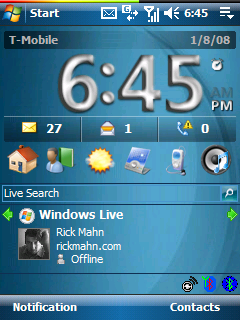
Latest today screen on my T-Mobile MDA

Windows Mobile 6 - I think I’ve finally stumbled across my favorite Windows Mobile 6 today screen configuration.  At least until I can get a new phone. ;-)

I have to admit that I’ve uninstalled all the software that I usually run.  This is not a reflection on the software that I removed at all - I simply am finding that I don’t need such powerful software for the today screen.  So the standard HTC Home plug-in and Windows Live plug-in does the trick.

Also, I’ve gone back to the standard built-in Pocket Outlook mail client.  Combined with GMail’s recent support for IMAP, I’m finding that I don’t need my hosted Exchange account to push mail to my phone any longer.

Also, with mobile support for my favorite online services - I’ve trimmed down the software I need for practically everything.  It’s impressive how much one’s needs evolve over time, and how much services mature and adapt.  It’s not nirvana, but it’s gotten much easier to use a mobile device than in any previous year.

With that said, what phone do you think is the best combination of technology, design and ease of use?

Conversation Tags: , ,
Categories: Windows Mobile

Some related posts you may enjoy:


If you enjoyed this post, please consider to leave a comment or subscribe to the feed and get future articles delivered to your feed reader.

Comments

Hey Rick, Happy new year to you. My Bday was on the 7th and I believe as a gift you should tell me how to do what you did with your MDA!!!! Please!?!?!?! Also how do I go about setting up Gmail with my MDA now that its IMAP? You’re always a big help!

Charly


Hi Charly,
The best place for information is XDA Developers. My advice is to read, read, read. As for IMAP, the instructions for setting up Windows Mobile (along with many other email clients and phones) is available direct from Google in the Gmail Settings area. Go to the settings page for IMAP & POP, make sure to enable IMAP, and then follow the link underneath for instructions on setting up your client. FYI for Windows Mobile 6 users - stick to plain text instead of HTML mail for now - there is a problem with pocket Outlook rendering HTML email from GMail’s IMAP at this time - no good reason why.

Regards,
Rick


I think that things are already overcomplicated as far as using mobiles for web access goes, I spend hours online every day yet I have never used my mobile to do it, ever! However, as you say things are getting easier with more streamlined systems available, but things are hotting up in the battle for mobile content and we may see things getting even more complex for a while as mobile content providers and web giants start to “brand” or lock mobile devices in a bid to get a bigger market share - how about a Googlephone or an AOLcommunicator both tied into networks and content!


Leave a comment

(required)

(required)