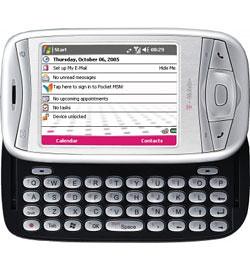
T-Mobile MDA (HTC Wizard) Call Dropping Issue Fixed

T-Mobile MDA Windows Mobile Pocket PC PhoneI’ve had the worst problem with my T-Mobile MDA dropping calls about 4 minutes into a call. While the exact time of the drop varied (sometimes up to 10 minutes into a call) it was consistent to the point that everyone I talked to knew about when it would happen.

I’ve been searching all over the ‘net trying to find the cause of the issue and a fix/workaround for it. I finally found it! Not only are MDA’s having the problem, but many HTC Wizard class devices like the Cingular 8125.

The problem seems to appear after upgrading to the latest firmware from the provider - in my case the v2.26 ROM from T-Mobile (though I did see it as well with the 2.24 ROM for QTek on my device). The issue is that HTC had implemented a “feature” in the latest ROM that would help a data connection re-establish itself when it was unsure if the GPRS/EDGE connection was there. It would simply reboot the radio portion of the phone - whether a voice (GSM) session was in process or not!

The fix is to simply add a registry key that disables this new “feature”. Now that I know what the fix is, I needed to share it with anyone who passes by my blog. If you have this problem and use a HTC Wizard class device listed below, please check out the fix and the link to where I found it.

list

Here is the fix to the problem, and this page at XDA Developers clued me in.

Due to network conditions, signal coverage and some other factors, there is a small chance the data connection can become detached from the network, but the device is not aware of the detachment. This is normal in real world scenarios. Since data packages can be sent without any error being returned, the device may incorrectly think the connection is still valid. To correct this, HTC introduced a mechanism to watch for such conditions. After the device sends out data without receiving any network acknowledgment for a certain period of time, the device will try to detach from the network and re-establish the data connection. Usually this will silently re-establish the data connection without the user noticing it. Due to radio platform limitations, this task cannot be performed during a voice call. When both of these conditions are met (data being sent out for a period of time with no network acknowledgment, and an active voice call), the device will reset the radio to address the problem.

HTC has provided the following registry key setting to disable the auto-correction mechanism:

[HKEY_LOCAL_MACHINE\Drivers\BuiltIn\RIL]

“GPRSStallWorkaround”=dword:0

I truly hope that this helps you with your HTC Wizard class device - I know I’m much happier now that I’ve found the fix for the problem.

Conversation Tags:

Some related posts you may enjoy:

  • Sorry, there are no posts related to this entry!

If you enjoyed this post, please consider to leave a comment or subscribe to the feed and get future articles delivered to your feed reader.

Comments

I’ve had this same problem with my MDA. T-Mobile is now (FINALLY) tracking this problem in conjunction with HTC. Hopefully, there will be an offical fix from them at some point in the not-too-distant future. However, this fix seems to be (mostly) working for me: I’ve had one dropped call that fit the pattern since I implemented it, and I was dropping almost every call.


Brian, its nice to see that T-Mobile is finally responding. This has been an issue since mid-2006, but it is not just restricted to the MDA ROMs. It seems like many HTC Wizard 2.2x ROMS have this issue.

I too have had very good success, with only a call dropped with this fix - and I’m not sure it was related to the data radio reset at all.

Glad to here this fix is working for people.


Hi:
I’ve been looking for this solution for many, many months. I hope it works. I begin every call with the instructions that “I’ll call you back when we get cut off.” And I joke about how my TMobile phone works like a charm (more or less) all over the world…just not in the US.

Thanks! I’ve installed the fix and I hope it works.


Hi Bob, I hope it works for you as well! I’ve set this tweak every time I re-build my MDA (don’t ask - I try stuff…) and it always takes care of the call dropping problem for me.

Cheers,
Rick


Yes! It works like a charm. Three hour-long calls without a drop!
Finding this may be the most useful Google search that I’ve ever composed: t-mobile dropped calls mda


Thanks a lot, It is working smooth again. I was having some problems with my mobile without a solution. Thanks again…


I can’t believe i found this. Its the *exact* problem (dropped calls at 4 minutes) i’ve been having ever since upgrading the ROM. But i didn’t realize that was when it started.

I spent a long while on the phone with TMobile yesterday concerning this problem and they claimed the problem was with the SIM card.

I specifically asked if they have any record of trouble with dropped calls on the MDA and they said “no”.


Groves, Felippe, and Bob,
I’m glad I shared this bit of info. I shared your frustration and searched like crazy - it’s probably harder to find now than a year ago or so, so I’m just glad that I could help out!

Cheers!,
Rick


Just got off the phone with T-Mobile again. I tried to tell them about this posting and the problem with 2.26 ROM, but they refused to even look at the article because its considered “3rd party troubleshooting”.

The tech rep then went on to state that they only acknowledge “Known Issues” from the manufacturer. In other words, if HTC doesn’t tell them about the problem, it doesn’t exist.

Nice.


Hey i’m having an issue with my t-mobile mda concerning the radio and gprs/edge connection. i was speaking on the phone with a friend, and my connection dropped. Since that phone call dropped, my phone hasn’t been able to find a connection, it is constantly seaching and has been doing so after soft and hard resets. My phone has been like this for the past 9 hours and really need help with this issue, I really need to use my phone daily. thanks.

-E-


Hi Eman! I don’t know if there is much to do other than reset the phone. Here are the two things I’d try:

  • Shut the phone down, take out the battery for about 5 minutes, put it back in and power up - see what happens.
  • Perform a “hard” reset (instructions are in the manual) on the phone. Be aware that this will erase any contact, calendar/meeting, and other data that you may have saved in the phone (pictures, music, voice notes, etc…)

Other than this, I’d get on the line with tech support and see what they can help with. If the phone is under warranty they should be able to replace it. Hope you find the solution!

Regards,
Rick


so how exaclty do i edit the registry ?
What and where do I add this..
I realy need this fix, my phone is dropping calls like crazy, and I cant manualy switch networks if I want to ,, anyone know what causes this?


Alex, I use Total Commander for this. It’s a file manager in addition to a registry editor.

Cheers,
Rick


Is this just for dropped calls, or does this have any relation to the signal dying and getting that little “…” searching indication, where it takes like 5 minutes to reestablish a signal (Also the G/E symbol goes to an X)?


Jacqueline, I don’t believe that it’s related to general call dropping problems. This fix addresses the problem when an application forces a data connection during a voice call - ending that voice call. I suppose I could have been more descriptive in the post title. :)


Thanks for the info on this issue. BTW, does anyone know how to disable the “screen tap” clicks withing WM. I have tried unchecking the “Screen Taps” option under Settings > Sounds and Notifications to no avail. TIA


Glad that helped Joe! Unfortunately, I have no suggestions on the screen tap sounds issue that your experiencing. Have you checked the forums at XDA Developers? Sometimes there’s answers there.


Leave a comment

(required)

(required)